


T-Shirt Design Studio
4.4643.00 Reviews
App Specs
- Version
- 4.9
- Updated On
- License
- Free
- Downloads
- 5,000,000+
- Developer
- PVS Studio
- Categories
- Shopping
- Platform
- Android, iOS
Screenshots
 Analysis by AppCompare
When I need to turn a rough idea into something I can actually judge on a shirt, I want the design step to feel quick rather than like learning a professional graphics suite. T-Shirt Design Studio is aimed at that kind of casual, hands-on creation: it gives you a place to assemble a shirt concept on your phone and decide whether the result is worth sharing, printing, or reworking. My main impression is that it is approachable, though a simple design app should not be mistaken for a complete production studio.
How quickly can you get from idea to mock-up?
The app is free to download, and its basic appeal is easy to understand: choose a shirt canvas, make visual choices, and see a design take shape. That makes it useful when inspiration arrives at an inconvenient moment, such as while planning a family gathering or thinking up a birthday present. You can sketch out a direction on your phone instead of waiting until you are at a computer, then decide whether the idea has enough potential to develop further.
For a first-time user, the clearest advantage is the short distance between opening the app and doing something creative. There is no need to begin with a blank professional design package or learn a complicated workflow just to test a phrase and a graphic together. I would still treat “quick” as a reasonable expectation for simple concepts, not a promise that every project will be instant: choosing among visual options and refining a layout can take longer than the initial setup.
A practical way to save time is to decide on the message before browsing fonts. If you start by picking a short phrase and the mood you want—playful, understated, or bold—you can narrow your choices rather than trying every combination. I also find it helpful to keep a rough idea of the shirt color in mind first, because a design that looks lively on one background may lose contrast on another.
Where the workflow can feel demanding
Simple tools are at their best when a design has one clear focal point: a short line of text, a personal image, or a small combination of both. A more crowded concept asks you to make many decisions at once, and that is where working on a phone screen can feel less comfortable. I would build a busy design in stages, checking the overall balance after each addition instead of dropping in every image and decorative element at the start.
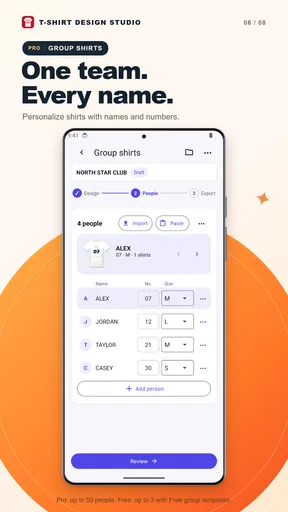
That staged approach is useful for a real everyday job, too. Imagine making matching shirts for a weekend family event. I would first settle on the shirt style and a shared color direction, then test the wording, and only after that add any personal detail such as a name or small image. This helps keep the group design consistent while leaving room for individual variations. It also makes it easier to spot when a design is becoming too cluttered to read at a glance.
Using your own image can make a shirt feel much more personal, but it brings a trade-off: the source image matters. A clear, well-cropped picture is a safer starting point than a tiny or complicated image, especially when the final design needs to remain legible at shirt size. Before committing to an order, I would inspect the composition carefully and check that important details are not sitting too close to the edges of the design area.
Worth Reading Before You Choose

Flipboard Shows What News Apps Must Do Beyond the Feed

Switching to Android Auto Means Rethinking Your Driving Routine

Google Calendar Makes a Crowded Week Easier to Manage

Ludo King Makes the Most of the Minutes Between Plans

Baby Panda World Brings Quick Play to Modern Phones, but Its Game Library Feels Busy

ESPN’s Live Game View Makes Following Close Games Easier
Reliability, printing, and expectations
For casual experimentation, the app’s focused purpose makes it easy to understand what to do next. Still, I would not treat a digital preview as a guarantee of how a finished garment will look. Screen colors and a printed shirt are different viewing experiences, so I would choose strong contrast and avoid relying on subtle shades if the design needs to be easy to read. That is a useful precaution whether you are making one shirt for yourself or preparing an idea for someone else.
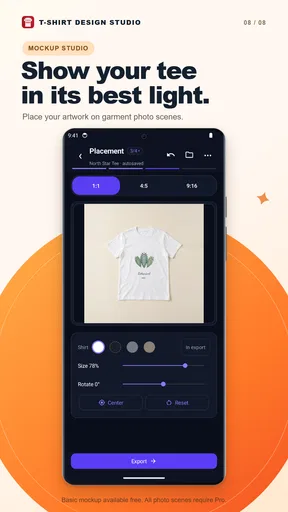
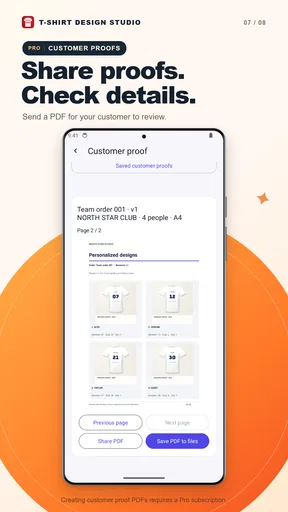
The app also connects the design stage with sharing and printing, which is convenient when you want to show a concept or explore turning it into a physical shirt. I would separate those decisions: first make a design you like, then review the final arrangement before placing an order. If you are creating a gift, leave room for a second look rather than ordering the moment the first version feels finished. A quick pause often catches a spelling issue, an awkward alignment, or a detail that seemed clearer on the phone than it does at a glance.
Recovery is another sensible part of any creative workflow. The original design describes undoing changes as an option, which encourages experimentation without making every choice feel permanent. Even so, I would make changes in small steps and avoid relying on memory to recreate a version you liked. If you reach a layout that works, take a moment to keep track of its key choices—such as the wording, color direction, and placement—before trying a more adventurous alternative.
Getting Started with Your First Design
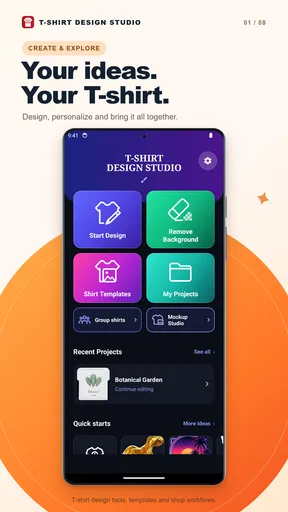
Jumping into T-Shirt Design Studio is a breeze. Once you download and fire up the app, you’re greeted with a super friendly interface. No over-the-top menus or confusing settings here—just a straightforward layout that’s easy on the eyes and even easier to navigate. It kind of feels like those old-school art classes but with a digital twist.
Start by choosing your canvas—literally. You pick the style of t-shirt you want to design. Whether it’s a V-neck, round neck, or even a hoodie, the app has you covered. And the color options? Endless. Seriously, it feels like you have the entire rainbow at your fingertips. This freedom to choose makes the app feel personal and unique right from the get-go.
Tools to Let Your Creativity Shine
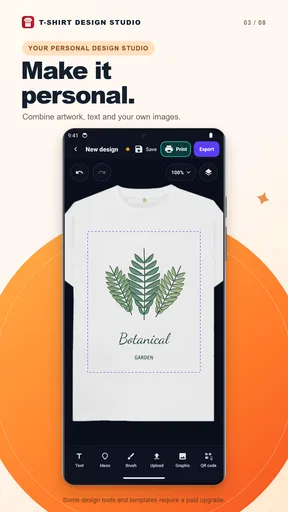
Once you’ve chosen your base, the fun really begins. The app offers a variety of tools to help you bring your vision to life. Want to add text? Easy. Just pick a font, type away, and adjust the size and color to your liking. The selection of fonts is impressive, ranging from sleek and modern to quirky and fun. I found myself spending way too much time just playing with different combinations.
Images and graphics are another area where the app excels. You can either choose from a library of pre-loaded images or upload your own. This is where things get really exciting. Imagine uploading a picture of your pet, adding some funky graphics, and voila—you’ve got a personalized tee that’s sure to turn heads.
Sharing and Printing Your Masterpiece
Once you’ve finished your design, sharing it with the world is a piece of cake. The app integrates smoothly with social media platforms. A few taps and your masterpiece is out there for your friends and followers to admire. The feedback from my friends was all positive, and I even got a few requests to design tees for them. Who knew I had a hidden talent?
But what if you want to wear your design? The app makes this process simple too. You can place an order directly through the app to have your t-shirt printed and delivered to your doorstep. The quality of the prints is surprisingly good for an app-based service. I was a bit skeptical at first, but the end product exceeded my expectations.
A Few Tips for Fellow Designers
If you’re new to the world of t-shirt design, don’t be afraid to experiment. The app is forgiving, and you can easily undo any changes if things get a little too wild. Play around with different color schemes and fonts until you find a combination that speaks to you.
Another pro tip: check out some online resources or design communities for inspiration. Sometimes seeing what others have created can spark new ideas and take your designs to the next level. Remember, the goal is to have fun and express yourself.
Choosing it over other design routes
Compared with a general-purpose graphics editor, this shirt-focused approach is less intimidating when the goal is simply to see an idea on apparel. A desktop design tool is still the better choice when you need precise control over layers, print-ready artwork, or a tightly managed production process. I see this app as a starting point for concepts and personal projects, not a substitute for specialist software when exact output requirements matter.
It is also different from ordering a ready-made shirt through a shopping app: here, the appeal is shaping the design yourself rather than browsing finished products. That makes it a better fit for a custom gift or a small personal idea than for someone who only wants the fastest route to buying a plain garment. If you already have finished artwork and care more about print specifications than creative play, a dedicated printing workflow may suit you better.
The creator behind the app is PVS Studio. It sits in the shopping category, but I would approach it chiefly as a design-and-order tool rather than a broad store for comparing clothing. The app is free, with in-app purchases priced at $1.49 per item, so I would check the cost of any optional purchase before tapping through. Its Everyone content rating also makes the basic creative activity suitable to consider for a wide range of ages, with younger users sensibly guided by an adult when placing an order.
Who will get the most from it?
I would recommend it to someone who wants to make a personal shirt without first learning a full design program: a pet owner playing with a photo idea, a friend planning a one-off present, or a group organizer exploring a shared theme. It can also be handy for testing several simple concepts before deciding which one deserves more time. The key is to treat the phone version as a convenient place to develop the idea, not as proof that every complicated design will translate perfectly to fabric.
On the other hand, I would skip it if your work depends on exact brand colors, precise print dimensions, complex artwork, or repeatable production files. It may also be the wrong choice if you only want to browse and buy existing clothes, since the creative process is the central attraction. For those needs, a professional graphics tool or a conventional clothing retailer is a more direct alternative.
Device fit and final performance verdict
The app’s current version is 4.9 and it requires Android 6.0 or later. That gives Android users a clear compatibility checkpoint before installing. As with any design app, a larger screen can make visual decisions more comfortable, while a smaller phone is convenient for quick edits but less forgiving when judging fine placement. I would not assume that a device’s available storage or speed guarantees a particular experience; keeping the project simple and closing other demanding tasks can be a sensible way to make a phone-based creative session feel less cramped.
It has been available since February 25, 2019, and its standing among users is reflected in a 4.4 average from around 24,000 ratings, alongside more than 5 million installs and 642 written reviews. Those figures suggest that many people have tried it, but they are not a promise that every design or order will meet your expectations. I would use the rating as background, then judge the app by whether its straightforward shirt-making workflow matches what I actually need.
My performance verdict is measured: it looks best suited to quick, focused design sessions, where you can test a phrase, choose a base, and refine one or two visual elements without turning the project into a marathon. I would approach a large, intricate composition more patiently and review it before sharing or ordering. For casual customization, gift ideas, and early concept sketches, T-Shirt Design Studio offers a friendly route from thought to shirt design. If you need professional-level precision or just want ready-made clothing, I would choose a different tool; for creative experimenting on a phone, it is an approachable place to begin.
Pros
- User-friendly interface for quick design.
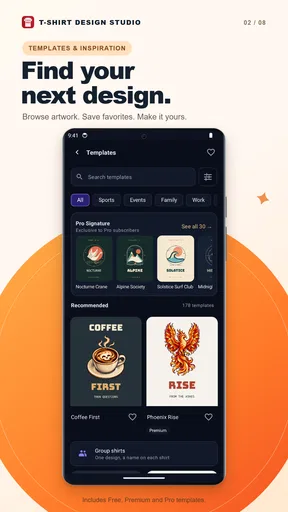
- Wide range of templates available.
- High customization with fonts and colors.
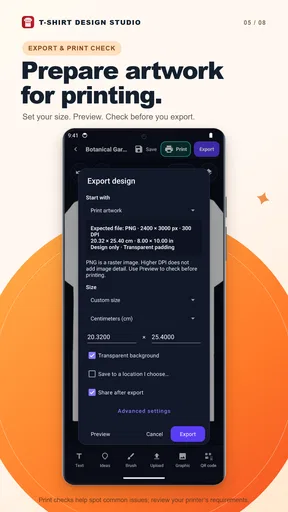
- Supports high-resolution exports.
- Integrates easily with social media.
Cons
- Limited free design elements.
- Occasional app crashes reported.
- In-app purchases can be pricey.
- No option for bulk design creation.
- Requires internet for full features.
FAQs for T-Shirt Design Studio
What features does T-Shirt Design Studio offer?
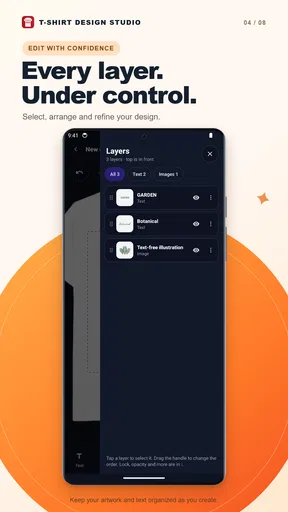
T-Shirt Design Studio provides a comprehensive suite of tools for creating custom designs on t-shirts. Users can choose from a vast library of templates, fonts, and clipart, or upload their own images. The app also includes color editing tools and a layer management system, making it perfect for both beginners and experienced designers.
Is T-Shirt Design Studio user-friendly for beginners?
Yes, T-Shirt Design Studio is designed with beginners in mind. It features an intuitive interface with easy-to-use drag-and-drop functionality. The app provides tutorials and tips to help newcomers get started, ensuring that anyone can create professional-looking designs without prior experience in graphic design.
Can I print my designs directly from the app?
T-Shirt Design Studio allows users to export their designs in high-resolution formats suitable for printing. While the app itself doesn’t provide direct printing services, it partners with several online print shops, allowing you to order your custom t-shirts directly through linked services, ensuring convenience and quality.
Does T-Shirt Design Studio require an internet connection?
T-Shirt Design Studio can be used offline for designing purposes, allowing you to work on your projects without an internet connection. However, features like template updates and accessing online print services do require an internet connection. This flexibility makes the app versatile for both online and offline use.
What platforms is T-Shirt Design Studio available on?
T-Shirt Design Studio is available on both Android and iOS devices. It is optimized for smartphones and tablets, providing a seamless experience across different screen sizes. This cross-platform availability ensures that users can design on-the-go, regardless of their preferred device.


